 121Mb
Adobe Photoshop CS5 x32 Pre Release Portable - Phần mềm chỉnh sửa ảnh bản Portable

 Resize Pictures Plus 3.4.2 - Thay đổi kích cỡ ảnh hàng loạt | 5.02 Mb
 ACDSee - the worlds #1 digital imaging software. ACDSee Photo Manager is a comprehensive application ideal for acquiring, organizing, viewing, enhancing and sharing your images. With the image browser, you can find, organize, and preview images and media files on your computer, and you can efficiently acquire images from digital cameras, scanners, and other devices. A full-featured image viewer and media player quickly generates high-quality displays of your images and media files. You can run slide shows, play embedded audio, and display multiple page images. ACDSee supports over 100 image and multimedia file formats. Also, ACDSee includes a wide variety of image editing tools you can use to create, edit and touch-up your digital images.

 Photo editor to blend photos together, decorate pictures with frame, text, clips
Frame photo editor is a photo editor that would let you do the work YOUR way, but do it all for you. With Frame Photo Editor, you can easily enhance your photo effects by blending your digital photos onto another image. The photo will be masked as special effect which you can select from a lot of masks that Frame Photo Editor provides.You can also easily add cool frame, pretty flowers and cartoon clips onto your pictures.
You can add cool frames to your photos very quickly and easily. Resize, rotate, adjust color and add text to your pictures. Then you can mail to your friends or set as your desktop wallpaper. So, it can also enhance your desktop. Frame Photo editor makes you working with your digital photos as easy as possible!With Frame Photo Editor, you can easily enhance your photo effects by blending your digital photos onto another image. The photo will be masked as special effect which you can select from a lot of masks that Frame Photo Editor provides. You can also easily add cool frame, pretty flowers and cartoon clips onto your pictures. And you can insert text into pictures with speech frame. It makes your photo more interesting and attractive.You can easily change the size and position of the photos, flowers, cartoon pictures or text just by clicking and dragging them. You can even rotate the mask or the photo just with your mouse moving. After having edited pictures with Frame Photo Editor, you can print them, email them, or set as your Desktop Wallpaper. You may also upload onto website, your album on Internet etc. It’s also a photo album page maker.

 YS Instant Color Picker (ICP) is a must have tool for everyone who needs to work with color. With ICP, you can pick colors from any part of your screen, save up to 20 colors, and copy color values.
Pick Colors
Love that color? With Eye Dropper, you can pick colors from any part of the screen. You can zoom up to 8x or get 3x3 – 5x5 pixel average.
Save Colors
ICP 2.1 features a flexible color palette which resizes itself according to how many colors you have in it. It can store up to 20 colors in its color palette.
Save Time
Using auto copy feature, you can copy a color value only in one step: Just press the global hotkey and color values of the color under the mouse pointer will be copied to the clipboard. To use this color under another program, like Adobe Photoshop or Adobe Flash, you just need to paste it!
Copy Color Values
You can copy color values in different formats including RGB, HSL, HTML Hex, ActionScript, Delphi , VC++ and VB.
Copy Color Swatches
You can copy color swatches as bitmap and paste it to other applications like Adobe Photoshop. You can also copy all the palette as bitmap.
Paste Colors
Yes, you can paste colors, and it is not limited to Hex values! ICP can understand color values in RGB, HSL, HTML Hex, ActionScript, Delphi , VC++ and VB formats!
Save as YS Elvan Color List
You can save color palette as YS Elvan Color List file (.CLL) and open them using YS Elvan.
Select from Web Safe Colors
Quick Color Palette lets you pick color from a color spectrum or from a websafe color palette.
 Advanced JPEG Compressor is an invaluable and useful tool for everyone who knows what is a digital image.
This is surely a must-have tool if you own a scanner or a digital camera, use digital images whether at work, or at home.
This program allows you to convert images to JPEG format using the most powerful JPEG compression engine, shrink the large file size of your graphic files, optimize pictures for quickly loading from the Web, e-mail smaller image files faster and not exceeding email size limitations, resize images and make thumbnails.
Advanced JPEG Compressor can acquire pictures from your scanner or digital camera, and save them in the JPG format with the highest quality / file size ratio. You can easily scan, compress and e-mail photos from Advanced JPEG Compressor.
 Photo Effects Studio is a new program that will easily change your photos with the help of hundreds of unique filters. Professional photo effects are now available for everyone! Just select the necessary effect and enjoy the perfect result in a couple of seconds.The program allows you to add fantastic glows and fog, generate the effects of rain, snow, lightning and a starry night.... You will be able to create the effect of an old photo, pencil drawing, mosaic, engraving, book illustration and much more. Photo Effects Studio also includes a set of unique filters, for example, poker-work, cubism and photomontage.You will also be able to make your photos more stylish with the help of frames and masks and also add text and decorations. The program includes a large collection of classic and modern frames to any taste. They will add a final touch to your composition.A lot of effects, the possibility of their combination and also the comfortable interface of the program offer you limitless freedom for creative work!
Photo Effects Studio main features:
Comfortable and easy-to-use interface.
A wide choice of photo effects many of which are unique.
A lot of features for processing and decorating photos.
Thousands of filter combinations.
Completely secure order. Optional CD delivery.
 Nature Illusion Studio allows you to apply various effects such as water, weather, animated objects, or sound effects on any image to emulate various natural phenomena.
With the combination of both visual and sound effects, Nature Illusion Studio can produce very realistic animated nature scenes such as waterfalls, lakes, or seas.Once you have created the nature scenes, you can save it as screensaver, executable, gif and avi files. Nature Illusion Studio is a software that allows you to edit pictures.
 Color Wheel Pro is the only tool that allows you to see color theory in action: you can create harmonious color schemes and preview them on real-world examples. The preview is real-time: when adjusting the color scheme, you see the changes immediately.
Color Wheel Pro includes all the classic color schemes: Monochromatic, Analogous, Complementary, Split Complementary, Triadic, and Tetradic. You can create your own freeform color schemes that allow you to manipulate colors without restrictions. Color Wheel Pro supports both Mixing (Red-Yellow-Blue) and Visual (Red-Green-Blue) color wheel types. You can easily switch between these types and create color schemes based on both RGB and RYB wheels. You can experiment with saturation and lightness of each color in the scheme. This gives you unlimited variations of the same color harmony.

 Create powerful images with the professional standard!
Adobe Photoshop - the essential software for perfecting your images, Adobe Photoshop CS4 now offers productivity and workflow enhancements, powerful new editing tools, and breakthrough compositing capabilities.
Adobe Photoshop CS4 software accelerates your path from imagination to imagery. Ideal for photographers, graphic designers, and web designers, the professional standard delivers new features such as automatic layer alignment and blending that enable advanced compositing. Live filters boost the comprehensive, nondestructive editing toolset for increased flexibility. And a streamlined interface and new timesaving tools make your work flow faster.
Breakthrough 3D, motion graphics, and image analysis
• Direct painting on 3D objects
• Easy conversion from 2D to 3D
• Editable 3D properties (scene, materials, meshes, lights)
• High-quality output with new ray-tracing rendering engine
• 2D and 3D image compositing
• 3D object animation
• 3D/video support
• New, high-performance, nonmodal 3D engine
• Volume rendering
• Single-key shortcuts for editing motion graphics
• Preview and export of audio content and frame comments
• Quantitative data extraction
• Enhanced Count tool


 Nik Software Color Efex Pro™ 3.0 filters are the leading photographic filters for digital photography. The award-winning Color Efex Pro 3.0 filters are widely used by many of today's professional photographers around the world to save time and get professional level results. Whether you choose the Complete Edition, Select Edition, or Standard Edition, you’ll get traditional and stylizing filters that offer virtually endless possibilities to enhance and transform images quickly and easily.
Patented U Point® technology provides the ultimate controlto selectively apply enhancements without the need for any complicated masks, layers or selections. Control color, light and tonality in your images and create unique enhancements with professional results. With 52 filters and over 250 effects found in Color Efex Pro 3.0, you can perform high quality retouching, color correction, and endless creative enhancements to your photographs.
Updates to old favorites such as Classical Soft Focus, Darken/Lighten Center, and Vignette filters are joined by exciting new filters Film Effects, Glamour Glow, High Key, Tonal Contrast, Bleach Bypass, and more.


AAA Logo 2010 v3.10 Portable | 8.9 MB
AAA Logo is useful program for designing various logo’s. With its 8.500 logo objects & 500 premium logo templates there is definitely something to start with. Of course if you are more artistic soul you always have your own tools to play with.
With AAA Logo you can create almost any type of website graphics or business graphics for high resolution printing. Logos, banners, buttons, headers and icons for your website with rich colors, gradients, shadows and reflections. Business graphics such as business cards, letterheads, posters and other business stationery can be designed and printed directly from AAA Logo or created images can be exported for use with other applications.
Features:
- Not just for Logo Design ! - Design logos / business graphics in any industry - Create professional, high resolution images in clicks - Get started without having to open a manual - Get a lean, slim business graphics design machine.

Valentine love vector - Mẫu vector cho chỉnh sửa ảnh ngày Valentine
9 EPS, 1 CDR + Jpg preview | 6,6 Mb

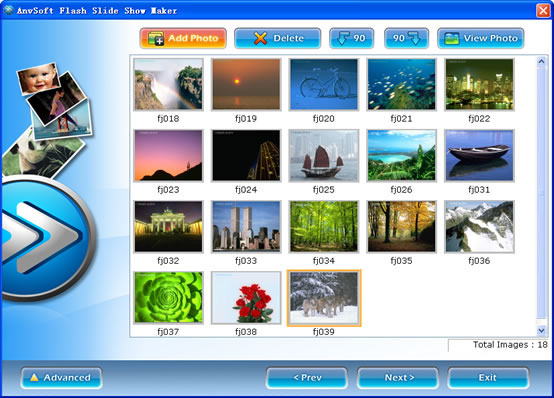
Flash SlideShow Maker transforms digital photo collection to Macromedia Flash file format ( SWF ) which you can share your memorial moments with your family or friends on your own homepage or website. With Flash SlideShow Maker, you can easily turn a folder full of still images into a stunning Flash slide show with background music and special transition effects.
This Flash slide show software allows you to add nice looking animated slide shows to your website in no time!
Here are some key features of “ANVSOFT Flash Slide Show Maker”:
- Easy to Use – ANVSOFT Flash Slide Show Maker is extremely user-friendly. Its friendly user interface enables you to create amazing slide shows out of your digital photos with quick and simple steps. No Flash knowledge or programming skills are required. Everyboday can make a flash album in less than 5 minutes. - Powerful Slideshow maker – Lots of built-in transition effects and prepared Flash templates can definitely add sweet to your entertainment. - Cool Style Flash Theme – Flash Slideshow Maker integrates more than fifty cool Flash template, so you can make a stunning Flash in minutes with a few clicks. - Stunning Banner Builder – Flash Slideshow Maker can build stunning banner (View Sample) with clicks. Lots of transition effects and styles to choose from make your website alive. - Emebed Mode or XML driven mode – Flash Slideshow Maker support embedded the photo and background music to create a single FLASH file. It also support to generate XML-driven slideshow. This XML driven mode is ideal for website. It doesn’t require any XML or coding knowledge. - Burn to CD, DVD disc – Flash Slideshow Maker is not only an idea slide show tool for website, but also a powerful tool for backup your photos. With Flash Slideshow Maker, you can burn the animated photo show to CD-R/RW,DVD-R/RW,DVD R/RW disc. Flash Slideshow Maker can save the origianl photos on disc, it’s an ideal way to backup your photos too.
- Easy to Use – Flash SlideShow Maker is extremely user-friendly. Its friendly user interface enables you to create amazing slide shows out of your digital photos with quick and simple steps. No Flash technologies or programming skills are required.
- Powerful Slideshow maker – Lots of built-in transition effects and prepared Flash templates can definitely add sweet to your entertainment.
