 GoldWave is a digital audio editor for Microsoft Windows. It features realtime
 amplitude, spectrum, and spectrogram oscilloscopes, intelligent large file editing, numerous effects, and support for a wide variety of sound formats. GoldWave can open and play .au files found in Java applications and on Web pages. It can convert to and from many sound formats including .wav, .voc, .afc, .au, and binary data. Special effects such as Doppler, distortion, echo, flange, and transpose can alter and enhance your audio files to create new and unique sounds. General Features: -Multiple Document Interface for editing dozens of files in one session -Large file editing (up to 1GB in size) -Configurable RAM (fast) or hard disk (large) editing -Realtime oscilloscopes (amplitude, spectrum, bar, and spectrogram) -Separate, resizable Device Controls window for accessing audio devices -Realtime fast forward and rewind playback -Numerous effects (distortion, Doppler, echo, filter, mechanize, offset, pan, volume shaping, invert, resample, transpose, noise reduction, time warp, pitch, and more) -Supports many file formats (.WAV, .AU, .IFF, .VOC, .SND, .MAT, .AIFF, .MP3 and raw data) and can convert to/from these formats -Drag-and-drop cue points -Direct sample editing with the mouse -Intelligent editing that automatically converts samples to ensure they are mixed and pasted correctly


 Power MP3 Cutter(MP3 Sound Cutter) is a useful tool that can cut MP3 or WAV segment from MP3 and WAV format files.

MP3 Doctor is an editing tool that lets you check, modify, and improve all your MP3s and WAVs in several ways. You can repair imperfect songs or modify them with TRIM, EQUALIZE, RESAMPLE, and a very efficient and improved NORMALIZE MP3 - VOLUME NORMALIZERfeature, and more (stretch, pitch, mp3 to karaoke...). The goal is to let you maintain a similar quality, volume and sound on all your existing MP3s and discover a new quality for you mp3 files.
In addition, it comes with encode and decode options (MP3 to WAV / WAV to MP3). You can modify hundreds of files with one click using 'Batch' mode or use 'Single' mode to process one file at time. In addition it can handle ID tags of MP3 files.
This version is a major Update that includes a very optimized Normalize Mp3 Volume Normalizer function that allows to get the lower parts of a song to higher levels. With this Super-Normalize feature the user could get all your songs to the best level possible. A new Karaoke feature was added, that lets the user to remove the vocals of an MP3 or WAV file. This functions works exactly by the same principle of the hardware vocal removers and get then similar results. Most songs could get the vocals removed, however it depends more on the effects and proccessing that the vocals has during the recording. On the other side, some other sounds of the song could be removed by using the Karaoke function, user can't expect to remove all the vocals on every file.
 Composing music is not only the privilege of the great music masters. You too can compose your music, songs and arrangements. Just as you use a word processor to write your mail, you can write, play, record, print and publish your music with Pizzicato, a music notation software. Yes, your notes, your music on paper with a professional quality. At home.Composing music is not only the privilege of the great music masters. You too can compose your music, songs and arrangements. Just as you use a word processor to write your mail, you can write, play, record, print and publish your music with Pizzicato, a music notation software. Yes, your notes, your music on paper with a professional quality. At home.
Composing music is not only the privilege of the great music masters. You too can compose your music, songs and arrangements. Just as you use a word processor to write your mail, you can write, play, record, print and publish your music with Pizzicato, a music notation software. Yes, your notes, your music on paper with a professional quality. At home.Composing music is not only the privilege of the great music masters. You too can compose your music, songs and arrangements. Just as you use a word processor to write your mail, you can write, play, record, print and publish your music with Pizzicato, a music notation software. Yes, your notes, your music on paper with a professional quality. At home.
Composing music is not only the privilege of the great music masters. You too can compose your music, songs and arrangements. Just as you use a word processor to write your mail, you can write, play, record, print and publish your music with Pizzicato, a music notation software. Yes, your notes, your music on paper with a professional quality. At home.Composing music is not only the privilege of the great music masters. You too can compose your music, songs and arrangements. Just as you use a word processor to write your mail, you can write, play, record, print and publish your music with Pizzicato, a music notation software. Yes, your notes, your music on paper with a professional quality. At home.


CoffeeCup MP3 Ripper & Burner is the perfect software for ripping, converting or burning your favorite music. It allows you to save your CD's to all kinds of music formats like MP3, OGG, APE, WAV, VQF and then play them back on almost any device.
Rip & Burn can be used for creating MP3's from your CD's and also converting other music formats to MP3 (like wav to mp3) or back and forth. It has a built-in Ripper, Audio Converter, CD burner, CD Labeler, and Song and Artist detection too. When you are done just listen to them on your computer, at home, your car or any portable MP3 player like an iPod, Nomad, or Rio.It has everything you need to make music the way you want too. Fast and Easy. Some Features of CoffeeCup MP3 Rip & Burn * Can rip to MPEG Layer 3">MP3, OGG, APE, VQF and WAV files * Includes CD jewel case cover creator * In just one click you can rip CD to MPEG Layer 3">MP3, OGG, APE, VQF and WAV directly * Choose advanced settings such as VBR Methods and Quality * Choose your own Bitrate, Samplerate and more * Design and Print your custom CD Covers to use on your CDs * Save your CD layouts to use at later times
LINK DIRECT: DOWNLOAD

LINK DIRECT: DOWNLOAD
 With Karaoke CD+G Creator it is easy to:
- create CD+G karaoke versions of your favourite songs with lyrics, title image, and credits image
- replace CD+G lyrics with your own version (create parodies, translations, etc.)
- use Vocal Remover to remove vocals from CD recordings and create CD+G karaoke from them
- convert MIDI Karaoke (KAR) to CD+G songs
- add extra dimension to CD+G karaoke with colors, images, countdowns, and other cool features
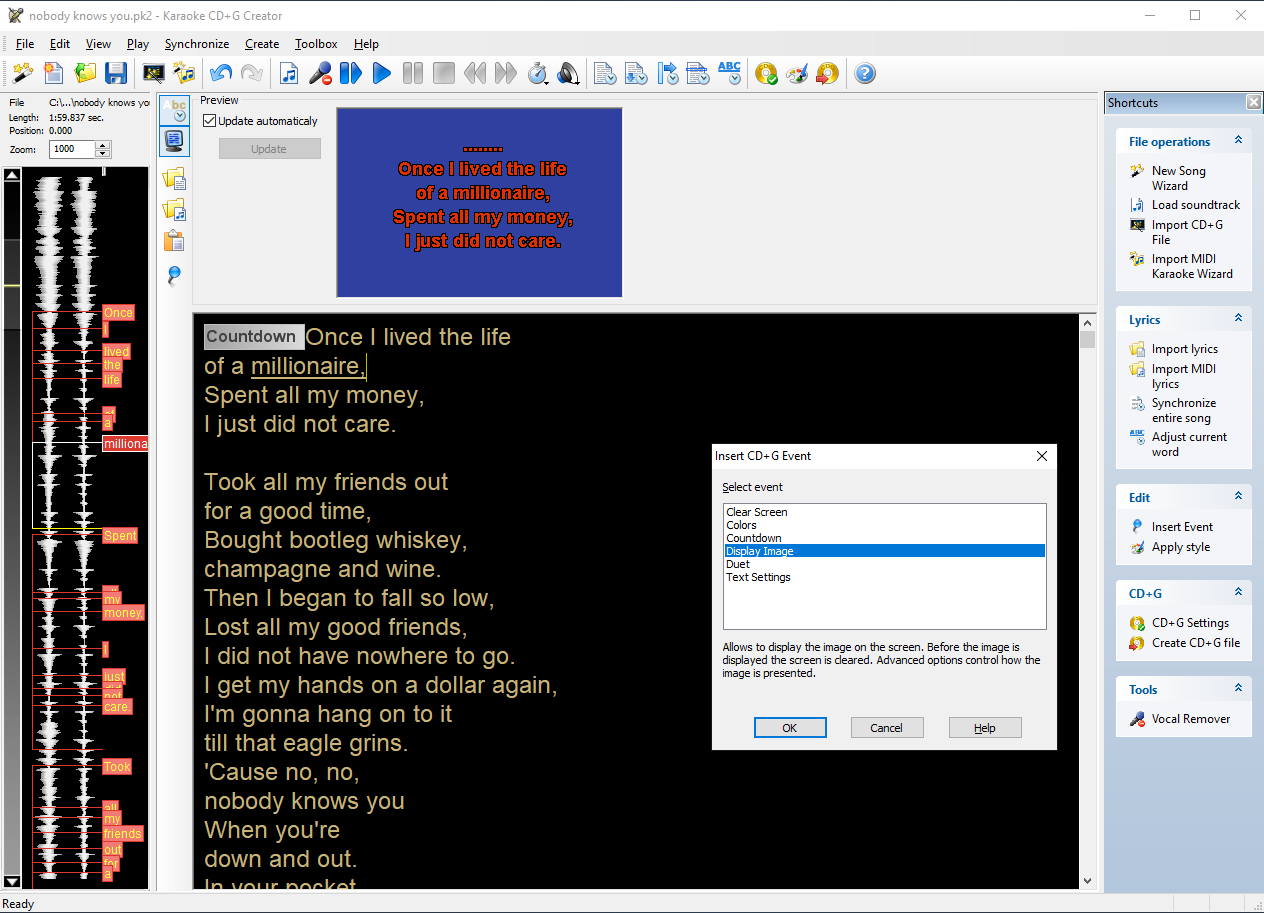
Karaoke CD+G Creator is a CDG Karaoke authoring tool. It allows to create a CD+G karaoke song from scratch or can import KAR (MIDI Karaoke) files (tool for searching for MIDI karaoke on the web is included).
You may use any MP3 or WAV file as a karaoke soundtrack, you may even use Power Vocal Remover to remove lead vocal from many non-karaoke CD recordings.
Karaoke CD+G Creator is designed to be as easy to use as possible. Step-by-step tutorials will show you how to enter lyrics (or look them up on the internet), how to synchronize them with music, and how to create CD+G song in a matter of minutes.
Advanced options allow to fine-tune the CD+G karaoke track (insert title and credits screen, change font, display images, and more).
Free Power CD+G Player included allows to play CD+G and MP3+G karaoke songs from your harddisk (both window and full screen mode).
Link Direct : Download
Thông tin đăng ký:
Name: www.serials.ws
E-mail: www@serials.ws
Code: E640C-666BN-7DE8D-47CCA-47CCA-45CCG
 MP3 Splitter & Joiner Pro is the advanced version of MP3 Splitter & Joiner and provides more powerful features besides all features in MP3 Splitter & Joiner. It builds MP3 Splitter (MP3 Cutter) Pro and MP3 Joiner Pro in one, you can split a large audio file into multiple smaller pieces or merge multiple audio files to a larger one.
MP3 Splitter & Joiner Pro is able to merge and split audio files of extreme large size over 4GB. With 'Batch Split' feature, you can split multiple audio files easily by just a simple click.
Supports MP3, MPA, WAV, WMA/ASF, OGG, AIFF audio formats in MP3 Joiner Pro and MP3, MPA, WAV audio formats in MP3 Splitter (MP3 Cutter) Pro.
Main Features
* MP3 Splitter & Joiner covers all features in the standard version and provides more powerful features
Multiple Audio Formats Support
* MP3 Splitter Pro supports MP3, MPA, WAV audio files and MP3 Joiner Pro supports MP3, MPA, WAV, WMA/ASF, OGG, AIFF audio files.
Extreme Large Audio File Support
* MP3 Splitter & Joiner Pro is able to join and split extreme large audio files over 4GB.
MP3 Splitter Pro
Batch Split
* Split multiple audio files in a single split session by just a simple click.
Split Group Support
* You can quickly and easily set split parameters to all audio files in a split group, such as switch split mode, split special, save list, edit ID3 tag, etc.
Automatic Split Mode
* MP3 Splitter & Joiner Pro will analysis the MP3 file you just loaded in 'Auto. Mode' and then automatically select the best split mode for you.
MP3 Joiner Pro
Automatic Merge Mode
* MP3 Splitter & Joiner Pro will analysis the audio file you just loaded in 'Auto. Detect' Mode and then automatically select the best merge mode for you.
Build-in Audio Converter
* MP3 Splitter & Joiner Pro is able to directly merge audio files in different audio formats or in different encoding parameters.
Multiple Audio Formats Support
* MP3 Splitter Pro supports MP3, MPA, WAV audio files and MP3 Joiner Pro supports MP3, MPA, WAV, WMA/ASF, OGG, AIFF audio files.
No Sound Quality Loss and Fast
* Split and merge MP3 files directly without MP3 re-encoding in most cases, it is fast and keeps exactly the same sound quality of original audio files.
* MP3 re-encoding will be applied only if the 'Conversion Merge' Mode is selected in MP3 Joiner Pro.
Extreme Large Audio File Support
* MP3 Splitter & Joiner Pro is able to join and split extreme large audio files over 4GB.
* The playback feature is disabled if the file size loaded in MP3 Splitter Pro is over 4GB.Features of MP3 Splitter Pro
Batch Split
Split multiple audio files in a single split session by just a simple click.
Split Group Support
You can quickly and easily set split parameters to all audio files in a split group, such as switch split mode, split special, save list, edit ID3 tag, etc.
Features of MP3 Joiner Pro
Automatic Merge Mode
MP3 Splitter & Joiner Pro will analysis the audio file you just loaded in 'Auto. Detect' Mode and then automatically select the best merge mode for you.
Build-in Audio Converter
MP3 Splitter & Joiner Pro is able to directly merge audio files in different audio formats or in different encoding parameters.
Link Direct : Download
MP3 Splitter & Joiner Pro is the advanced version of MP3 Splitter & Joiner and provides more powerful features besides all features in MP3 Splitter & Joiner. It builds MP3 Splitter (MP3 Cutter) Pro and MP3 Joiner Pro in one, you can split a large audio file into multiple smaller pieces or merge multiple audio files to a larger one.
MP3 Splitter & Joiner Pro is able to merge and split audio files of extreme large size over 4GB. With 'Batch Split' feature, you can split multiple audio files easily by just a simple click.
Supports MP3, MPA, WAV, WMA/ASF, OGG, AIFF audio formats in MP3 Joiner Pro and MP3, MPA, WAV audio formats in MP3 Splitter (MP3 Cutter) Pro.
Main Features
* MP3 Splitter & Joiner covers all features in the standard version and provides more powerful features
Multiple Audio Formats Support
* MP3 Splitter Pro supports MP3, MPA, WAV audio files and MP3 Joiner Pro supports MP3, MPA, WAV, WMA/ASF, OGG, AIFF audio files.
Extreme Large Audio File Support
* MP3 Splitter & Joiner Pro is able to join and split extreme large audio files over 4GB.
MP3 Splitter Pro
Batch Split
* Split multiple audio files in a single split session by just a simple click.
Split Group Support
* You can quickly and easily set split parameters to all audio files in a split group, such as switch split mode, split special, save list, edit ID3 tag, etc.
Automatic Split Mode
* MP3 Splitter & Joiner Pro will analysis the MP3 file you just loaded in 'Auto. Mode' and then automatically select the best split mode for you.
MP3 Joiner Pro
Automatic Merge Mode
* MP3 Splitter & Joiner Pro will analysis the audio file you just loaded in 'Auto. Detect' Mode and then automatically select the best merge mode for you.
Build-in Audio Converter
* MP3 Splitter & Joiner Pro is able to directly merge audio files in different audio formats or in different encoding parameters.
Multiple Audio Formats Support
* MP3 Splitter Pro supports MP3, MPA, WAV audio files and MP3 Joiner Pro supports MP3, MPA, WAV, WMA/ASF, OGG, AIFF audio files.
No Sound Quality Loss and Fast
* Split and merge MP3 files directly without MP3 re-encoding in most cases, it is fast and keeps exactly the same sound quality of original audio files.
* MP3 re-encoding will be applied only if the 'Conversion Merge' Mode is selected in MP3 Joiner Pro.
Extreme Large Audio File Support
* MP3 Splitter & Joiner Pro is able to join and split extreme large audio files over 4GB.
* The playback feature is disabled if the file size loaded in MP3 Splitter Pro is over 4GB.Features of MP3 Splitter Pro
Batch Split
Split multiple audio files in a single split session by just a simple click.
Split Group Support
You can quickly and easily set split parameters to all audio files in a split group, such as switch split mode, split special, save list, edit ID3 tag, etc.
Features of MP3 Joiner Pro
Automatic Merge Mode
MP3 Splitter & Joiner Pro will analysis the audio file you just loaded in 'Auto. Detect' Mode and then automatically select the best merge mode for you.
Build-in Audio Converter
MP3 Splitter & Joiner Pro is able to directly merge audio files in different audio formats or in different encoding parameters.
Link Direct : Download


 Cool RingTone Maker is a windows desktop application let you make your own ringtones for cellphone or cut music to pieces.
Cool RingTone Maker support most popular video and audio formats like MP3, WMA, WAV, AMR, WMV, AVI, MPG, 3GP, MP4, FLAC, OGG, WMV, MOV etc, Which means you can cut ringtones not only from audio files, but also from video files.
Features:
* Customize Your Own RingTones For CellPhone
* Cut Music Or RingTones From Movie And Clips
* Share Your Customized RingTone With Your Friends
* Support Most Popular Ringtone Formats: MP3, WMA, WAV, AMR
Cool RingTone Maker is a windows desktop application let you make your own ringtones for cellphone or cut music to pieces.
Cool RingTone Maker support most popular video and audio formats like MP3, WMA, WAV, AMR, WMV, AVI, MPG, 3GP, MP4, FLAC, OGG, WMV, MOV etc, Which means you can cut ringtones not only from audio files, but also from video files.
Features:
* Customize Your Own RingTones For CellPhone
* Cut Music Or RingTones From Movie And Clips
* Share Your Customized RingTone With Your Friends
* Support Most Popular Ringtone Formats: MP3, WMA, WAV, AMR

MP3 Splitter & Joiner Pro is the advanced version of MP3 Splitter & Joiner and provides more powerful features besides all features in MP3 Splitter & Joiner. It builds MP3 Splitter (MP3 Cutter) Pro and MP3 Joiner Pro in one, you can split a large audio file into multiple smaller pieces or merge multiple audio files to a larger one. MP3 Splitter & Joiner Pro is able to merge and split audio files of extreme large size over 4GB. With 'Batch Split' feature, you can split multiple audio files easily by just a simple click. Supports MP3, MPA, WAV, WMA/ASF, OGG, AIFF audio formats in MP3 Joiner Pro and MP3, MPA, WAV audio formats in MP3 Splitter (MP3 Cutter) Pro.

 32/96 Audio - 16-bit, 24-bit, and 32-bit audio up to 96 kHz
DirectX plug-ins in real-time and offline-processing modes
True Multitasking Lets you perform edits during playback
Non-destructive editing
Ultra-fast cut and paste
Sample-accurate editing
Overlays
Fade-in and fade-out
Custom fades
Markers
Edit History
Manual Crossfade
Reversal
Gearshift
GainChange/Normalize
Sound Catalog
Playlist Editor
Simultaneous Record and Play*
Punch-In*
Scrub
And Much More - Long filenames - waveform scrolling - transport control - time display
32/96 Audio - 16-bit, 24-bit, and 32-bit audio up to 96 kHz
DirectX plug-ins in real-time and offline-processing modes
True Multitasking Lets you perform edits during playback
Non-destructive editing
Ultra-fast cut and paste
Sample-accurate editing
Overlays
Fade-in and fade-out
Custom fades
Markers
Edit History
Manual Crossfade
Reversal
Gearshift
GainChange/Normalize
Sound Catalog
Playlist Editor
Simultaneous Record and Play*
Punch-In*
Scrub
And Much More - Long filenames - waveform scrolling - transport control - time display
 Cool RingTone Maker is a windows desktop application let you make your own ringtones for cellphone or cut music to pieces.
Cool RingTone Maker support most popular video and audio formats like MP3, WMA, WAV, AMR, WMV, AVI, MPG, 3GP, MP4, FLAC, OGG, WMV, MOV etc, Which means you can cut ringtones not only from audio files, but also from video files.
Features:
* Customize Your Own RingTones For CellPhone
* Cut Music Or RingTones From Movie And Clips
* Share Your Customized RingTone With Your Friends
* Support Most Popular Ringtone Formats: MP3, WMA, WAV, AMR
Link Direct : Download
Cool RingTone Maker is a windows desktop application let you make your own ringtones for cellphone or cut music to pieces.
Cool RingTone Maker support most popular video and audio formats like MP3, WMA, WAV, AMR, WMV, AVI, MPG, 3GP, MP4, FLAC, OGG, WMV, MOV etc, Which means you can cut ringtones not only from audio files, but also from video files.
Features:
* Customize Your Own RingTones For CellPhone
* Cut Music Or RingTones From Movie And Clips
* Share Your Customized RingTone With Your Friends
* Support Most Popular Ringtone Formats: MP3, WMA, WAV, AMR
Link Direct : Download


VirtualDJ is the DJ software used by many big brands such as Numark or Hercules, and is used around the world by bedroom DJs and professional superstars alike. It features cutting-edge technology such as advanced beatlocking, automatic seamless loops, synchronized sampler, on the fly remix, music video mixing and scratching, timecode
Link Direct : Download

